The Gateway That Runs Where Your Model Runs
Using the Azure API Management Self-Hosted Gateway to govern GenAI when the GPUs are yours and the data can't leave the building.
Every time I write about a single AI Gateway in front of many models, the same question comes back. Someone says: fine, but our models don't run in Azure. They run on our GPUs, in our data center, because the data can't leave the building — so does any of this still apply to us?
It does. And the component that makes it apply is the Self-Hosted Gateway. It usually gets described as "APIM in a container for legacy APIs," which undersells it badly. For on-premises AI it's the more interesting half of the deployment: you keep authoring policy in Azure, and the thing that enforces it sits in the same rack as the model.
The same gateway, just shipped as a container
The Self-Hosted Gateway is a Linux container image of the same APIM gateway that runs in Azure, available in the classic Developer and Premium tiers — not Premium v2. You run it wherever the models live — plain Docker, any Kubernetes, OpenShift, an Azure Arc-enabled cluster as a cluster extension, another cloud. It's deployed with a Helm chart or a ConfigMap and scales with HPA or KEDA like any other workload. In production, pin the full {major}.{minor}.{patch} tag; rolling tags are convenient right up to the moment a scale-out event quietly brings up a newer build next to the old one.
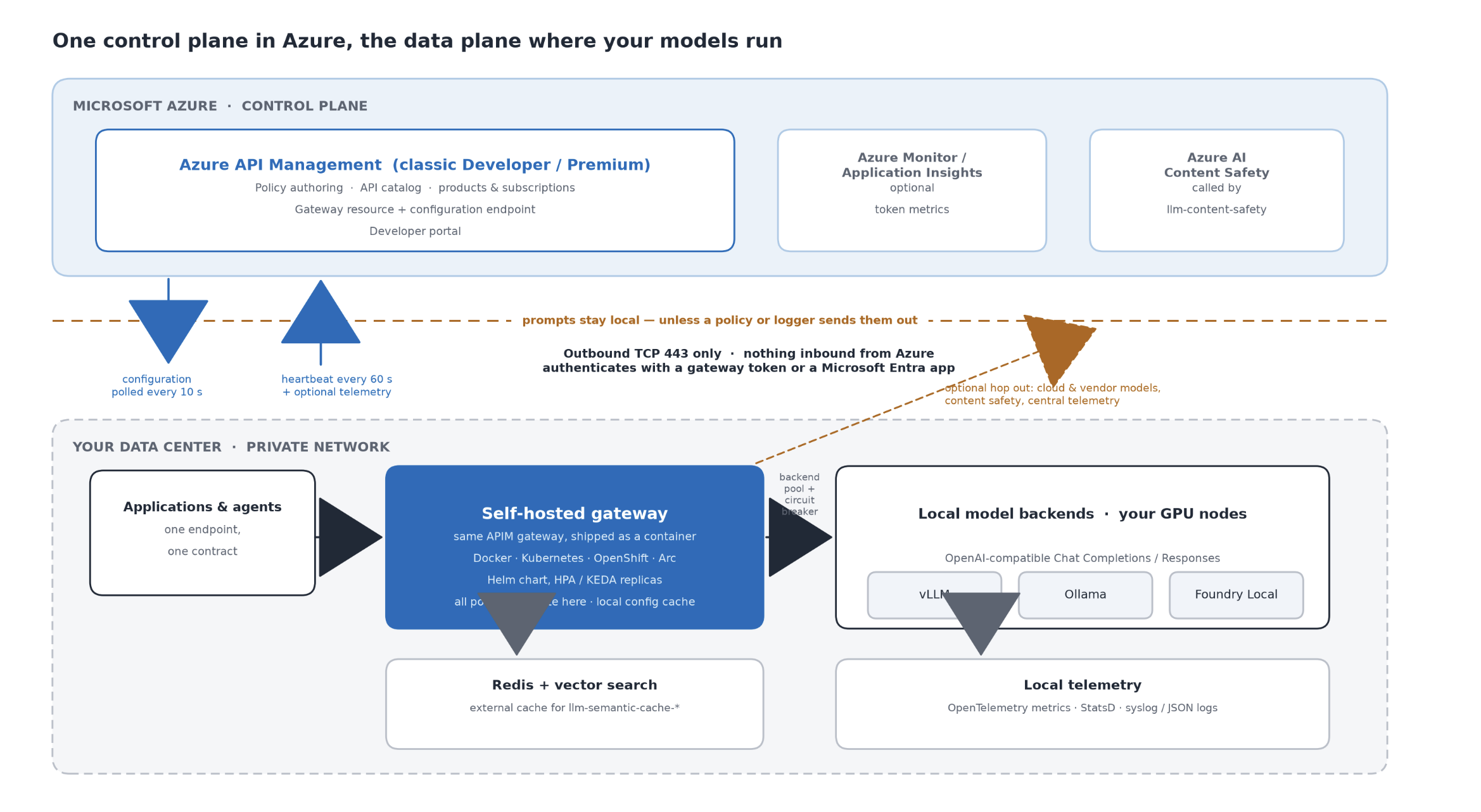
The split is the whole point. The control plane stays in Azure and the gateway reaches out to it over outbound 443 only — nothing inbound. It sends a heartbeat every minute and polls for configuration changes every ten seconds, authenticating with either a gateway token or a Microsoft Entra app. The data path — the actual prompts and completions — goes client to local gateway to local model and doesn't touch a cloud region unless a policy or logger sends it there. Azure AI Content Safety does exactly that, and Application Insights can too if request or response body logging is enabled. With those paths disabled, you get lower latency, no egress on every completion, and no awkward conversation with your risk team about where the prompt technically went.
The gateway is federated with an APIM instance in Azure but serves traffic locally: configuration comes down over 443, heartbeat and optional telemetry go up, and the prompts stay in the building unless a policy or logger sends them out.
Your local models look like every other model
The gateway supports Microsoft Foundry models and models from other providers, and the on-premises case rides on the same mechanism: an OpenAI-compatible endpoint — vLLM, Ollama, Foundry Local, a vendor inference server on your own hardware — can be imported as a language model API. The generic import currently creates a Chat Completions surface; a Responses endpoint has to be modeled explicitly. And "OpenAI-compatible" needs to mean compatible on the wire, including paths, streaming events and usage fields, not merely that the server accepts a similar JSON body. Applications can still keep one endpoint, one credential model and one contract while you decide behind the gateway whether a request lands on a GPU downstairs or a model in Azure.
Backend pools and circuit breakers work here too, which is what turns a pile of inference nodes into something you can operate. Weighted or priority-based distribution across local servers, with breakers that remove unhealthy nodes from subsequent pool selection — the same primitives you'd use across cloud regions, applied to a rack. One detail matters under failure: the request that trips a breaker is not automatically replayed against the next node; add an explicit retry policy if that is the behaviour you need. Reserved capacity can go first and a slower or shared node can act as spillover once every backend in the higher-priority group is unavailable.
What runs on every call
The AI Gateway policies aren't a cloud-only luxury. These run on the self-hosted gateway, with a few on-premises specifics worth knowing:
- llm-token-limit — Tokens-per-minute limits and hourly-to-yearly quotas per app, team or key, with remaining and consumed token counts returned as headers. On-prem it protects something scarcer than a cloud quota: a fixed number of GPUs. Two behaviours to internalize — with streaming enabled, prompt and completion tokens are always estimated, and counters are kept per gateway rather than aggregated across the whole APIM instance. Replicas in one cluster can synchronize through the gateway's local discovery service, but you have to configure that path and it doesn't cross into another cluster, site or the managed gateway. Treat the result as a cluster-local budget, not a global one.
- llm-semantic-cache-lookup / -store — Caches responses by meaning rather than exact match. The self-hosted gateway has no built-in cache, but it does support an external Redis-compatible cache — so you can run Redis with the RediSearch module and vector search on-prem and point the embeddings backend at a local embeddings model, keeping both inside the boundary. Plain Redis without vector-search support isn't enough. Start with a score threshold around 0.05, partition with vary-by so no tenant reads another's cached completion, and put a rate limit right after the lookup so a cache outage doesn't become a stampede on your GPUs. On fixed capacity, the cheapest token is the one you never compute.
- llm-content-safety — Prompt Shields, harm categories with per-category thresholds and custom blocklists, enforced on the way in and on the way out, including a sliding-window handler for streamed responses. This is the one policy with an honest caveat on-prem: it calls the Azure AI Content Safety service, so it's an outbound dependency and sends the inspected prompt or response content outside the site. In a strictly disconnected site, a local moderation model called through send-request can replace the inbound check, but it is custom policy plumbing rather than a drop-in substitute; reproducing sliding-window moderation for streamed output takes additional handling.
- llm-emit-token-metric — Prompt, completion and total token counts with your own dimensions — app, team, model, use case. The policy writes those custom metrics to Application Insights, so it is another Azure dependency, not the route into your local OpenTelemetry collector. It also depends on usage data from the model response; interrupted streams or servers that omit usage fields produce incomplete numbers. When those conditions are acceptable, it gives dedicated hardware the usage basis needed for internal rates and charge-back.
- validate-jwt and managed identity — Entra ID tokens and scopes checked before any model is touched, and the gateway authenticating to Entra-protected backends itself so no keys ship with the apps. Managed identity doesn't make an arbitrary local inference endpoint keyless: that endpoint still has to accept an Entra token for the configured resource.
One trap deserves its own line: policies the self-hosted gateway doesn't support are silently skipped at runtime. No error, no warning — the request just goes through ungoverned. Test your policy sets against an actual self-hosted gateway, not against the managed one.
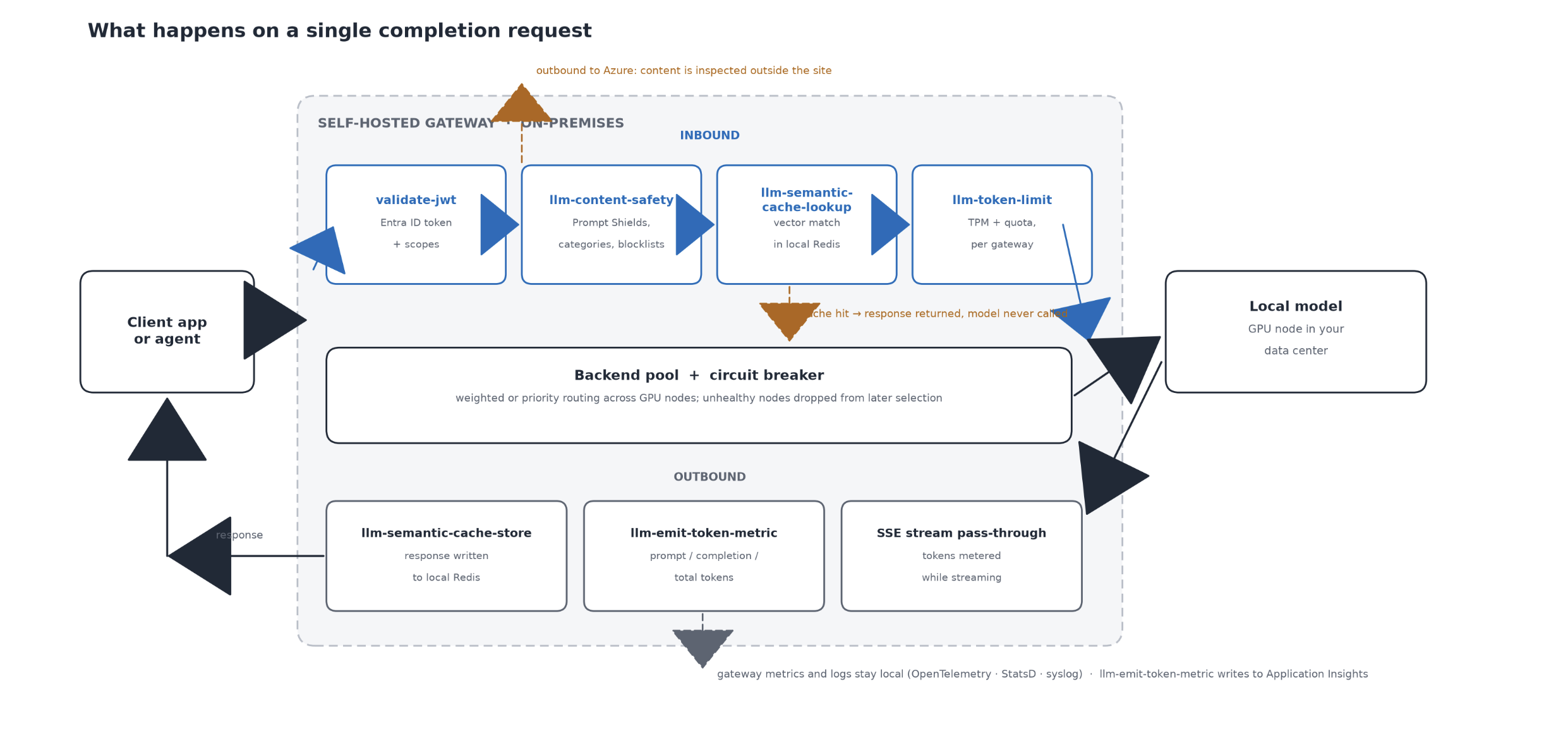
A single completion request, end to end: token and safety checks before the model is touched, a semantic cache hit that skips it entirely, and token metering on the way back out.
Telemetry you're allowed to keep
This is where the self-hosted gateway is genuinely richer than the managed one. It's the only gateway that exports metrics, including system metrics, to an OpenTelemetry collector; that path is not an export of request logs or traces. It emits local metrics over StatsD and writes logs to stdout as text or JSON, to local syslog, to RFC5424, to journald, or to a JSON UDP endpoint — so your request-level telemetry can land in the stack you already run, inside your own network. Sending gateway metrics to Azure Monitor and events to Application Insights stays optional, although policies such as llm-emit-token-metric require Application Insights if you choose to use them.
The caveat is the mirror image: the self-hosted gateway doesn't send resource logs to Azure Monitor and API analytics isn't available, so the central view is thinner than with a managed gateway. The built-in health endpoint is there for your own probes.
Agents and tools, on-prem too
Agent traffic doesn't change the model. MCP server pass-through works on the self-hosted gateway, as does exposing an existing REST API as an MCP server — so tool calls get the same authentication, limits and telemetry as chat completions. WebSocket and gRPC pass-through and HTTP/2 in both directions are supported, and Dapr integration is exclusive to the self-hosted gateway, which matters if your on-prem platform already runs it. A2A agent APIs are the current gap: they're not supported on self-hosted yet, so agent-to-agent governance still terminates in the cloud.
When the link to Azure drops
It's designed to fail static. Lose connectivity and running gateways keep serving traffic from their in-memory copy of the configuration. Turn on configuration backup to a persistent volume and even a stopped gateway can start from the last known-good copy. When the link returns, the gateway reconnects and pulls everything it missed.
That keeps local-only APIs alive, but it doesn't make cloud-dependent policies local: Azure AI Content Safety, llm-emit-token-metric and any other outbound Azure call can fail or lose data while the WAN is down. For a factory floor, a branch site or a data center behind a temperamental WAN, the difference between a telemetry gap and an AI outage is therefore in the policy design.
Read the small print
It isn't a drop-in clone of the managed gateway, and pretending otherwise costs you a weekend. There's no built-in cache, so bring Redis. Token and rate counters are local to a gateway deployment unless you configure synchronization among replicas in the same cluster. GraphQL resolvers and validation, get-authorization-context, credential manager, Service Bus integration and Defender for APIs threat detection aren't there. TLS session resumption and client-certificate renegotiation are missing, so if you use client certificates, turn on Negotiate Client Certificate on the custom hostname and have clients present them during the initial handshake. And it's classic Developer and Premium tiers only, not Premium v2.
On the other side of the ledger you can configure cipher suites separately for client and backend connections, turn on revocation checking, and mount your own CA certificates — which in most on-prem estates isn't a nice-to-have.
Why this fits
Regulated data that can't leave the data center. Owned GPUs where capacity has to be shared fairly between teams that all think they're the priority. Edge and factory sites on unreliable links. Multicloud estates where models run in three places and the platform team wants one policy repository, one catalog, one set of keys. In all of them you get the same answer: a new model, a new vendor, a new on-prem deployment plugs in behind the same door, inherits the same policies, and shows up in the same logs.
Bottom line
The model moved on-premises. The control plane doesn't have to follow it. You author the policy once in Azure — token budgets, semantic cache, content safety, backend pools — and it executes on a container standing next to your GPUs. The prompts stay in the room when every policy, logger and dependency on their path does too. That isn't a downgraded gateway. For on-prem AI, it's the better half of the deployment.